
Home » Latest Articles » CAASM Use Case #9 – Finding Unsanctioned Software
Welcome to the ninth instalment in our series exploring the practical applications of Cyber Asset Attack Surface Management (CAASMCyber Asset Attack Surface Management (CAASM) focuses on man… More).
Today, we’re diving into a critical challenge faced by cybersecurity professionals: identifying and managing unsanctioned software within your organization.
Imagine this scenario: Your company has strict software policies in place, but you suspect that employees might be using unauthorized applications.
How do you find these potential security risks hiding in plain sight? That’s where CAASMCyber Asset Attack Surface Management (CAASM) focuses on man… More comes in.
Regulatatory Compliance
Vulnerabilities
Data Leaks
Inefficiences
Increase Attack Surface
Lack of visibility
Unsanctioned software is a thorn in the side of IT and security teams everywhere. These applications, while potentially useful for employees, can pose significant risks to your organization’s security posture. They might include:
The challenges in finding this software are numerous:
This is where SJULTRA’s CAASM services, becomes your incident response nitrous boost.
It’s like giving your security team a time machine and a crystal ball, all rolled into one.
CAASMCyber Asset Attack Surface Management (CAASM) focuses on man… More pulls data from a smorgasbord of sources:
By correlating this data, CAASMCyber Asset Attack Surface Management (CAASM) focuses on man… More creates a rich, unified view of your entire digital ecosystem. It’s like having a digital map of your entire IT landscape, with every device, user, and cloud instance clearly labeled.
The software that’s installed on your devices will be one of three types:
The goal with SJULTRA CAASMCyber Asset Attack Surface Management (CAASM) focuses on man… More is to build up these lists so it makes it easy to query your IT landscape and put software in the correct bucket.
To find unsanctioned software, you will need to connect to adapter sources that glean lots of information on devices directly. These include:
Using the CAASMCyber Asset Attack Surface Management (CAASM) focuses on man… More Security Policy Enforcement Center, you can also initiate WMI scans to generate a list of installed software for all windows devices.
Searching for specific unsanctioned software can be done by using the Installed Software: Software Name field. Using the OR switch and the contains function allows searches for multiple software instances simultaneously.
This query below shows a search for any device that has metasploit, or nmap.
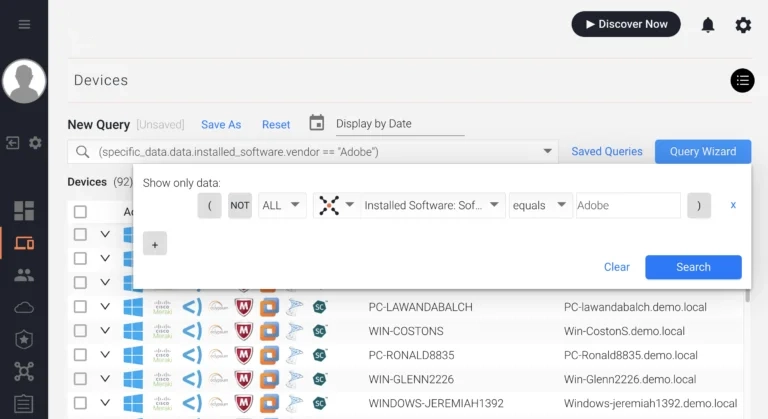
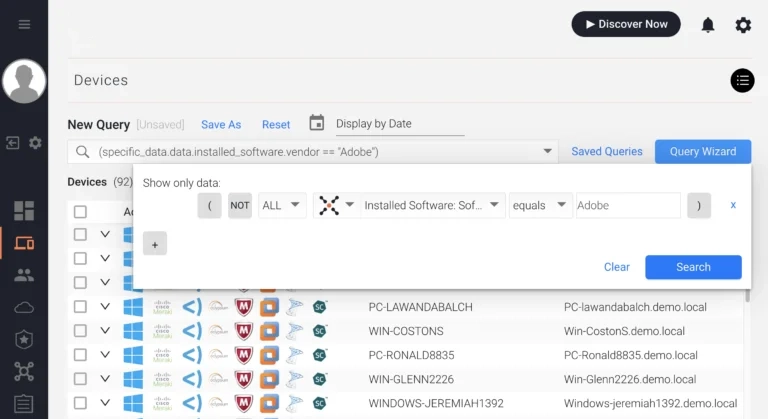
If there are certain software vendors your company does business with, you can simply search by the software vendor using the Installed Software: Software Vendor field.
For example, Adobe.
For more complex scenarios, try these advanced queries: via CAASMCyber Asset Attack Surface Management (CAASM) focuses on man… More Query Language (AQL):
installed_software.software_name == regex("tor|torrent|tiktok|wechat|popcorntime", "i")installed_software.software_name == regex("btcminer|bfgminer|cgminer", "i")installed_software.software_name == regex("poison ivy|sOnce you’ve spotted these digital apparitions, what next? CAASMCyber Asset Attack Surface Management (CAASM) focuses on man… More lets you automate your ghostbusting:
Finding unsanctioned software is just one of the 14 powerful use cases for CAASMCyber Asset Attack Surface Management (CAASM) focuses on man… More. By leveraging SJULTRA’s Cybersecurity Observability Service, you can take control of your software ecosystem and significantly reduce your attack surface.
Ready to see it in action? Start your free trial of SJULTRA CAASM today!
Remember, in the world of cybersecurity, knowledge is power. Stay vigilant, stay informed, and keep those unauthorized apps at bay!
Happy hunting, cyber defenders! 🕵️♂️💻🛡️
Read the documentation: Finding unsanctioned software.

