Installment twelve of fourteen. Today: the things still plugged in that everyone forgot about.
Obsolete assets are a history problem as much as an inventory one. A device isn’t obsolete because of what it is today — it’s obsolete because of what stopped. Support ended, the agent quit reporting, the last login was in 2021. That’s durable context accumulating on a record over time, and a nightly export can’t give it to you.
Some of them are in a closet rather than on the network. Those still have your data on them.
"What about the devices we've forgotten about? The old servers in the basement, the outdated laptops in storage, or the legacy systems we never quite phased out? How can we secure what we can't even remember?" (Chief Information Officer)
Kapow! It’s the cybersecurity equivalent of archaeological excavation – you know these digital artifacts exist, but where are they hiding?
Fear not! This is where CAASMCyber Asset Attack Surface Management (CAASM) focuses on man… More (Cyber Asset Attack Surface Management) and cybersecurity observability become your digital metal detector.
This is what SJULTRA can help you solve with CAASMCyber Asset Attack Surface Management (CAASM) focuses on man… More and cybersecurity observability.
Table of Contents
Digital Fossils in Your Network: Obsolete Devices
Let’s break it down. Obsolete devices are the digital dinosaurs in your network. They’re devices that are:
No longer supported by the manufacturer
Running outdated operating systems or software
Unable to receive security updates
Forgotten but still connected to your network
These could be anything from that ancient Windows XP machine in the corner office to the first-generation IoT device someone installed years ago. They’re the “known unknowns” that make security pros reach for the antacids.
Who’s keeping track of these digital relics? How do you know they’re truly obsolete? How do you investigate them… before that 10-year-old server becomes your network’s Achilles’ heel? 😰
Enter SJULTRA's Cybersecurity Observability Service
It’s like giving your security team a time machine and a crystal ball, all rolled into one.
CAASMCyber Asset Attack Surface Management (CAASM) focuses on man… More pulls data from a smorgasbord of sources:
Endpoint Agents
Configuration and Patch Management Tools
Ticketing & Helpdesk Platforms
Networking Tools
Vulnerability Assessment Tools
IAMIdentity and Access Management is the technology and process… More Solutions
Cloud Infrastructure
By correlating this data, CAASMCyber Asset Attack Surface Management (CAASM) focuses on man… More creates a rich, unified view of your entire digital ecosystem. It’s like having a digital map of your entire IT landscape, with every device, user, and cloud instance clearly labeled.
Book your free CAASM trial now
Get visibility on all 14 cybersecurity observability use cases in less than 30 days with SJULTRA.
The ability to identify devices on or touching the corporate network is a challenge in and of itself.
In the past, when all devices were managed and corporate owned, enterprises could simply run scans and devices would appear.
Today, with remote work, cloud services, mobile devices, IoT devices, and other unmanaged devices, an entirely new set of complexities exists.
Running simple scans to identify devices communicating on the network, and/or deploying agent-based endpoint management tools, will result in an incomplete asset inventory and heightened cyber risk.
One area of such concern is obsolete devices, that is, outdated devices or unused devices that no longer serve a business purpose, yet are present (if not communicating) in the enterprise environment.
Most asset inventories fail to identify obsolete devices because they’re:
unknown/unmanaged
agents haven’t been or can’t be deployed on them
they haven’t communicated on the network and thus don’t appear in assessments
Let's get hunting!
Once we’ve got CAASMCyber Asset Attack Surface Management (CAASM) focuses on man… More set up (remember, SJULTRA offers a free 30-day trial), we can start excavating those elusive obsolete devices on the network.
CAASMCyber Asset Attack Surface Management (CAASM) focuses on man… More users can accurately and easily answer critical questions such as:
Which devices in my environment are latent or obsolete?
Where are the devices located?
What software is running on the devices?
Can the devices be updated/upgraded?
What other systems, devices, or users are connected to or accessing obsolete devices?
Where to go hunting: data sources
Start by connecting to key data sources such as:
Cloud Infrastructure platforms
Infrastructure Monitoring tools
Networking monitoring systems
MDM/EMM solutions
EDR/EPP tools
Configuration/Patch Management systems
ITAM/ITSM platforms
Vulnerability Analysis (VA) tools
IAMIdentity and Access Management is the technology and process… More solutions
UEM platforms
Virtualization monitoring tools
Now let’s look at some queries!
Multi-step queries to navigate the inventory maze and find obsolete devices.
This is a kinda unique-ish use case because you need to build up queries to “hone in on” the obsolete devices.
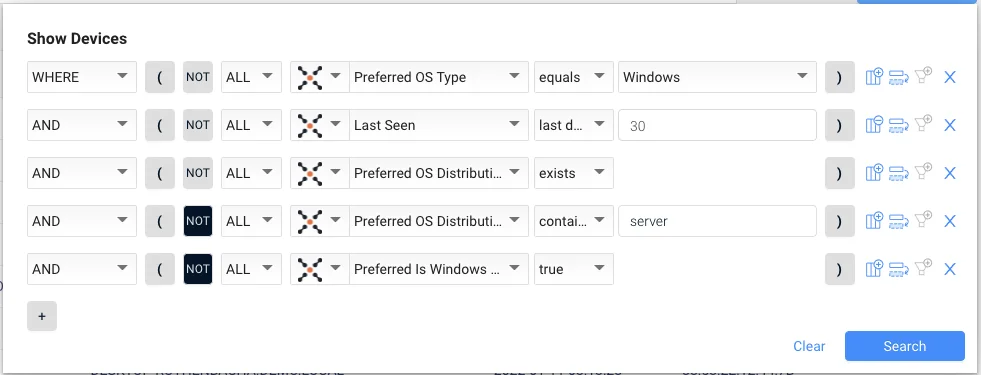
For example, one starting query for the old “workstations”:
Find all Windows OS devices…
Seen in the last 30 days…
Where it’s a preferred distribution…
But it’s not a server…
And it’s not a windows server…
So this is like creating a huge hill, then carving away pieces until you’re left with a lump of gold at the end.
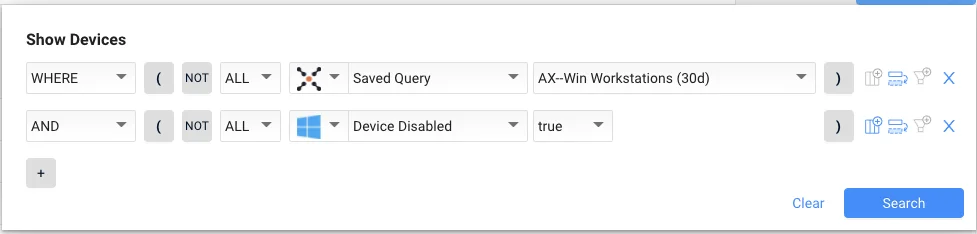
Here’s the cool “progressive” bit: you SAVE that query and give it a name like “Steve’s Quest for Obsolete Windows Workstations” (but the name in the picture before is “AX-Win Workstations (30d)” :-/
Then you can create a NEW query on top of this to check for, say, Active Directory is disabled.
Then the coup de grace is this:
“Next, we use the saved query, AX-Win Workstations (30d), as the basis to look for Windows workstations with an OS Build past their “end of support” date (i.e., “17763”). In addition an “and/or” expression is used to find devices that do NOT contain “LTSC” so that product edition Windows 10 Enterprise LTSC is excluded from the query since it is still supported by Microsoft.”
NOW with your carved out list of obsolete devices, you can investigate attributes such as:
Last Used User (if Active Directory or similar solutions know about the asset)
Operating System
MAC Address
Installed Software & Agent Versions
Network Interfaces
Vulnerable Software
Et voila! But now what?
Taking action with CAASM enforcement actions
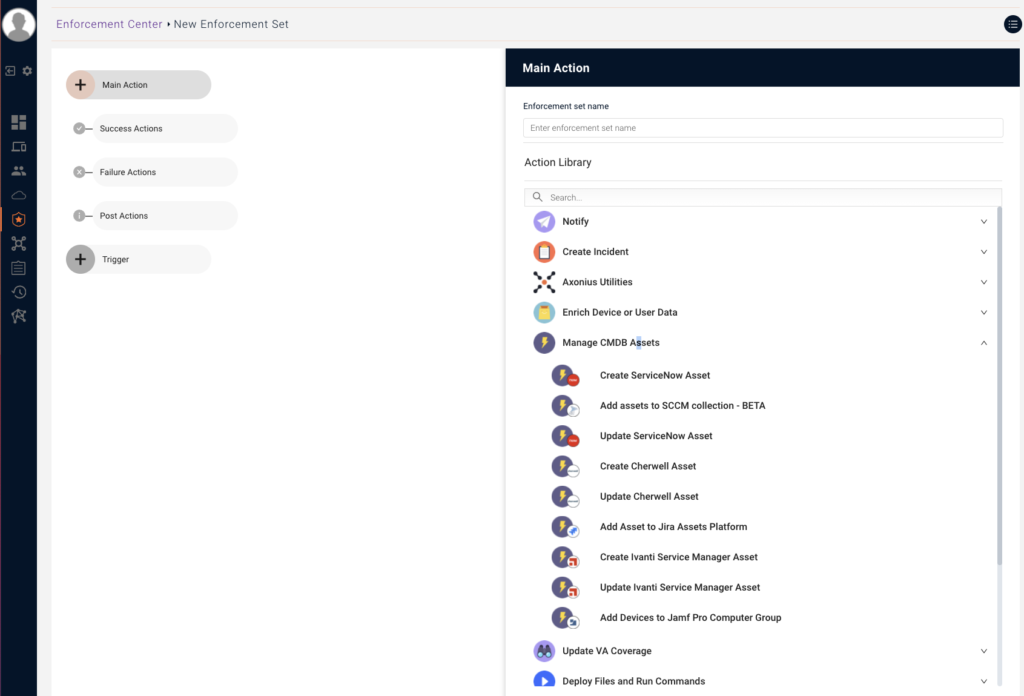
Great, we’ve uncovered these hidden digital fossils. What’s next? This is where the “action” part of our cybersecurity observability comes in. With CAASMCyber Asset Attack Surface Management (CAASM) focuses on man… More, we’ve got four aces up our sleeves:
Notify: Send alerts via email, Slack, or Teams (because who doesn’t love a good “we found a dinosaur” notification?)
Create Incident: Generate tickets in systems like ServiceNow, Jira, or Zendesk
Enrich Device Data: Use tools like Shodan or Censys to show what’s publicly known about the obsolete device
Update Asset Database: Automatically update your CMDB with the newly discovered obsolete devices
Summary
And there you have it, digital archaeologists! 🏺
That’s how we turn the forgotten threat of obsolete devices into a manageable, observable process.
It’s not just about finding old devices; it’s about making sure we’re seeing our entire digital ecosystem, even the parts covered in cobwebs.
Remember, this is just 12 out of 14 standard use cases we help our customers with as part of our CAASMCyber Asset Attack Surface Management (CAASM) focuses on man… More Concierge services. And guess what? You can get it for free!
In the world of cybersecurity, what you’ve forgotten can definitely come back to haunt you. But with the right tools and a bit of observability magic, we can dust off those digital artifacts and decide their fate.
Stay vigilant, keep querying, and may all your obsolete devices be discovered and dealt with!